

Expertise:
my blog

3 Things You Can Do Right Now To Improve Your Long-Term SEO Goals
(I wrote this article for D4 Creative Group. Full article posted on D4creative.com)
Everyone wants their website to rank well within the search engines. Yet, not everyone knows how to launch an effective program targeting the users within search engines.
Maybe this is why so many marketers jump to invest the bulk of their budgets into paid search campaigns without considering additional options for organic placement.
This is not to say that paid search efforts are not a necessary component within an effective marketing plan – because they typically are – instead it's simply to say that organic efforts are often neglected because they are deemed too hard to control and the results are not immediate.
While there are certainly guidelines and 'best practices' employed within all balanced search engine marketing programs, there are no magic tricks or secret recipes to ensure that your website ranks well. However, every business is different. Managing SEO is an evolving process that can take even the best marketers a few weeks (if not months) to perfect a strategy based on your goals and budget....
Read the rest of this article >Labels: B2B, Content Marketing, marketing, Search Engine Optimization
10/11/2013 02:56:00 PM
 Subscribe to RSS Feed
Tweet
Why B2B marketers can no longer ignore mobile technology
(I wrote this article for D4 Creative Group. Full article posted on D4creative.com)
It has been predicted that by the end of this year that there will be more smart phones on the planet than people. Yet within the marketing goals of many B2B companies in particular, there is an apparent indecisiveness or a hesitancy to apply tactics that reach their customers through mobile channels.
Need proof?
Many marketers still do not launch mobile optimized websites or landing pages as part of their marketing strategy. They seemingly overlook mobile targeted ad units within their media plans. They do not consider the impact of mobile on SEO. They do not largely focus how their promotional emails display within mobile devices. In fact, it seems as if many marketers are downright content with waiting until 'tomorrow' for these tactics...
Read the rest of this article >Labels: advertising, analytics, email, marketing, mobile, SMS
8/28/2013 10:47:00 AM
Subscribe to RSS FeedTweet
Common Sense (Email) Marketing
(I wrote this article for D4 Creative Group. Full article posted on D4creative.com)
I receive between 350-400 emails per day. Many of which I will never open. However it was an email today that stood out; albeit for the wrong reasons...
Have a Defined Strategy: Within email marketing you should have a defined goal. Are you hoping to create a sale opportunity? Do you want to increase loyalty among your customers? Will your content demonstrate thought leadership? In the above example, the person attempted to engage with me by asking if I was the appropriate person within the agency to target and then without providing any value other than (brand) name-dropping immediately attempted to sell to me.
Read the rest of this article >
Labels: analytics, email marketing, marketing, web strategy
6/18/2013 04:17:00 PM
Subscribe to RSS FeedTweet
5 Ways to Encourage CRM adoption amongst your Sales Teams
(I wrote this article for D4 Creative Group. Full article posted on D4creative.com)
These days I think you'd be hard-pressed to find a company out there that does not recognize the importance of lead generation. After all, even the most successful companies need to continually ensure that the pipeline is full.
So it's still surprising to me that many organizations have individuals within the sales function that don't rely on using CRM for their day-to-day job function. Typically, this is not to say that a company hasn't invested in a CRM, but instead that select teams do not use the tool or understand its merits.
I truly don't believe that your Sales team is being indigent about not using the tool. They simply don't see its value. When within Sales, your life tends to be somewhat nomadic; racing from one meeting to the next to close the next big deal. Many within sales see using a CRM as one more chore or a distraction from their primary objective – to close.
Over the years, I've heard of a number of coercion tactics utilized in an attempt to enforce usage of CRM: withholding commissions, not providing credit for the sale; even the threat of termination.
Read the rest of this article >
Labels: CRM, data, lead generation, sales
3/18/2013 05:46:00 PM
Subscribe to RSS FeedTweet
Successful Performance Planning and Analytics to Reach Marketing Goals
(I wrote this article for D4 Creative Group. Full article posted on D4creative.com)
As marketers we're responsible for a brand's reputation, brand equity and growth. We build campaigns with a call to action in mind and facilitate shared experiences or promote ideas.
However, a large number of marketers tend to focus more on performance results and analysis post campaign instead of during the strategic planning and executing phases. Confidence in measurement platforms that give actionable insight on a daily if not momentary basis, across the following areas should be paramount:
Read the rest of this article >
Labels: KPI, marketing, measuring success, metrics, strategy, web analytics
1/28/2013 05:42:00 PM
Subscribe to RSS FeedTweet
Five Questions to Ask Yourself Before Beginning Your Next Advertising Campaign
(I wrote this article for D4 Creative Group. Full article posted on D4creative.com)
It's January again.
And chances are great that you have either already survived the annual marathon of budget-planning sessions or you are currently learning the grim reality of how you are yet again going to achieve "more with less."
Since your "Higher-Ups" are extremely penny-wise these days, you won’t be surprised when they ask how your marketing 'mumbo-jumbo' impacts their bottom line. After all, you can count on the fact, every campaign you are about to undertake must clearly demonstrate an actual return-on-investment – albeit through a database of newly acquired leads, or a method for cross-selling or up-selling to existing customers.
So even if you already have a seemingly bulletproof program in place, how can you increase the likelihood that your program will not fall short?
Read the rest of this article >
Labels: advertising, marketing, ROI
1/24/2013 02:43:00 PM
Subscribe to RSS FeedTweet
Why is SEO so difficult to explain and implement?
If you are a "geek" like me, you have encountered many posts regarding how to explain search engine optimization (SEO) to your clients or workplace. I have come across many (good and bad) analogies to SEO using physical fitness, fishing, even sex. The truth is that many web marketers, myself included, are routinely challenged how to explain the purpose of SEO to the uninformed.
 Personally, I identify with numbers. The bottom-line resonates with me; perhaps it's my experience working with (and for) small-businesses. I have seen estimates ranging anywhere from 240,000,000 to over 1,000,000,000,000 total websites available on the WWW. Regardless of the total number, it should be clear that your web presence is going to be hard to come by for the average web user.
 It's imperative that you do everything in your power to ensure that your particular site becomes viewed by your audience. Otherwise, your site will not be noticed and you are throwing away your money - period.
About this time in the conversation, I usually receive a half-sarcastic (though perfectly reasonable) question. "Shouldn't you program all of your websites to allow for search engines to find your site?" The simple answer is - Yes!
I firmly believe that EVERY web developer should have basic knowledge of internal (website specific) search engine optimization tactics and Best Practices. This includes programming website elements with the following considerations:
- properly formatted CSS/HTML
- META description tag
- robot tags
- robots.txt
- Title tags
- ALT tags
- proper internal cross links
- avoiding duplicate pages/content
- 301 redirects
- creation and submittal of an XML sitemaps file
- Tagging non-HTML content (such as PDFs, DOCs, Flash and AJAX)

Beyond these above-mentioned tactics, I feel that SEO is an extremely complicated task. For you see, the above best practice tactics only allow search engines with the ability to properly query (search) your content. They do not ensure that search engines WILL in fact come to your site. -- HUH?!
Just to be clear, search engine optimization includes many more tactics than simply programming a site effectively. SEO also involves the following skillsets, which I believe are better suited for a marketer as opposed to a programmer:
- Keyword research:
Can you identify keywords that are going to more likely get you listed within SERPs (Search Engine Results Pages)? It should not be a guessing game. Nor should it involve spoofing or cloaking results to "trick" search engines into querying your page. - Competitive research:
It's always a wise idea to at least become familar with your competition. With regards to SEO, how does your site compare with the competition? What are they doing to ensure that their page appears within SERPs? How can you do a better job than them? - Organic linking strategies:
Is your site listed within third party business directories, local business listings, affiliate websites and networks? - Utilization of social media and other forms of emerging media:
Social media sites, blogs, forums, video sharing, and general WOM (word of mouth) sites all help in gaining your exposure. - Geo-targeting data when necessary:
Is your data more relevant in a particular country, state, region or zip code? There are tactics that you can employ to help users locate your site.  User/visitor retention:
Great! A user/visitor has arrived at your site for the first time. How do you ensure that your information resonates with them and draws them into coming back? Does this involve refreshing content regularly or do you need to perform A/B and/or multivariate testing? How do you know when to apply a particular tactic to ensure this occurs?- Knowledge Transfer:
There is quite a bit of "smoke and mirrors" with SEO. Unfortunately this field get's a bad rap for containing a good deal of "Snakeoil Salesman." The reputable ones routinely struggle to differentiate from the non-reputable. As a result, I feel a little education goes a long way in this field.
This differentiates me from others within my field. I strongly believe in teaching my clients and colleagues how to implement basic SEO strategies. I believe there are simple tactics that others can do that will aid in achieving a desired result.
10/15/2010 09:23:00 AM
Subscribe to RSS FeedTweet
How Will Google Instant Affect Search Engine Marketing?

Google feels that this will greatly enhance a user's experience because of it's ability to quickly provide accurate search results.
As I use this feature within Google, I have concerns about some of the business ramifications it may have on search engine marketing.
Will it hyper-inflate the bidding of short tail keyword bids?
Previously, a user needed to click "submit" before results were displayed. The action of pressing this button constituted somewhat of a commitment that the user was specifically looking for an entered keyword. Google Instant begins showing results after only a few characters are entered into the search input field.
Assuming a search result is relevant and accurate, if a user finds a somewhat related result after using a shorter phrase, will they stop inputting additional keywords? Will marketers need to focus more on bidding on these keywords and subsequently drive up the cost of individual keywords?
What will this feature do to long tail keyword bids?
Research has shown that when users make a search query, they will look for the quickest, most accurate result with the least amount of effort. Previously, long tail words offered higher conversions as they were more specific to a user's search query.
However, if results begin appearing after only a few characters being input into the search input field, will the majority of your basic search users stop inputting characters after the first results begin appearing? Will this result in marketers abandoning the long tail and focusing primarily on the short tail keywords? We already know that Google essentially charges less for long tail phrases because they have less bids against them. This subsequently means less money for Google. Making a fundamental change in displaying search results would effectively alter this and result in more income for Google.
Will marketers begin bidding on incomplete long-tail results in an effort to be listed first?
Previously, if for example I was running a campaign for a hospital in Philadelphia, PA (specifically for a Level One Trauma hospital), I may focus on the long tail term "Level One Trauma Hospital Philadelphia." Do I now need to also bid on incomplete phrases such as "Level One Trauma Hosp" as it is an incomplete term and results could potentially appear for a user? The cynic in me can't help but think that this is potentially an untapped gold mine for Google.
How will this change affect search results below-the-fold
If results can easily be modified by entering in (1) or more characters, will individuals scroll to see additional paid or organic results that appear below-the-fold? Will this change in behavior also force marketers to bid higher to avoid being trapped below-the-fold?
How will Google Instant affect my keywords' Quality Score?
If QS appears to be adversely affected, based on a user's input queries and unwanted impressions are resulted, will agencies begin changing their marketing strategies and ultimately their budgets? Especially in this economy, where relevant results are king, SEM's cannot afford margin for error.
Google states that Quality Score and overall impressions will not be affected and provides the three ways it will be affected. It states, when someone searches using Google Instant, ad impressions are counted in these situations:
- The user begins to type a query on Google and clicks anywhere on the page (a search result, an ad, a spell correction, a related search).
- The user chooses a particular query by clicking the Search button, pressing Enter, or selecting one of the predicted queries.
- The user stops typing, and the results are displayed for a minimum of three seconds
Labels: below-the-fold, Google Instant, keywords, long tail, quality score, SEM, short tail
9/11/2010 01:47:00 PM
Subscribe to RSS FeedTweet
Performing a Heuristic Evaluation
Wikipedia defines a heuristic evaluation as a usability inspection method for computer software that helps to identify usability problems in the user interface (UI) design.
How many websites and applications that you use routinely could benefit from this form of testing?
More often than not, usability problems negatively affect sales, result in larger than necessary bounce rates, and even increase operational costs in the form of unnecessary phone/email/chat support.
Yet, this evaluation process is a simple one: Involve a small group of testers to examine the user interface (UI) and identify problems in design (programmatic or aesthetic) so that they may be remedied accordingly.
From my own experience I have found that heuristic evaluations are best carried out when you provide your evaluators with the primary goals of the website and allow them to develop their own tasks in order to achieve these goals. Others may choose to be more rigid in their methodologies.
For a website I will typically create an evaluation checklist and bucket this list into simple categories. I typically choose the following categories: Navigation, Organization, Accessibility, Compatibility, Aesthetic Layout, Typography, Content, and On-Site Tools. However you may choose to add any additional category that may be relevant to your website or application.
Within each of these categories you may assign a series of questions for your evaluators to test. Be sure that the answers to each of these questions are simple Yes, No, or N/A answers. An example question for Navigation may be: "Is there always a clear indication of your current location within the entire site?" Having yes/no answers will allow you to definitively compare results and act accordingly instead of receiving subjective results. That being said, such evaluations can allow evaluators the ability to leave comments to describe their answer selection.
Lastly, I feel it is essential to evaluate all answers against a severity rating. Based on a evaluator's feedback, I will typically assign one of the following (4) selections to each of their answers.
- CRITICAL - A showstopper!. There is no way to avoid this bug. Normal usage or navigation of the site is not possible until a fix is made.
- HIGH - A critical bug. This bug appears frequently or is persistent and greatly hinders normal usage or navigation of the site.
- MED - A non-critical bug. This bug impairs normal usage or navigation of the site though can be avoided.
- LOW - A non-critical bug. This severity rating can even be reserved for general questions/considerations of the evaluator.
Once you have received feedback from your evaluators it is important that you carefully consider how to remedy the various issues that were encountered. Remember, when it comes to such evaluations, "there is no such thing as user error." If one evaluator found an element within your site confusing, it's highly likely that others do too.
Labels: heuristic evaluation, UI, Web Usability
1/01/2010 04:27:00 PM
Subscribe to RSS FeedTweet
Parsing Data Using Advanced Segmentation
I just thought I would fire off a quick post and share my experiences with "Advanced Segments" functionality in Google Analytics.
Imagine this scenario, you are granted "read" access to a client's GA account. Yes, "Read" access will allow you to view all reports. Missing within "read" access (amongst a several other capabilities) is the ability to filter data - in this case, traffic associated with your physical location as well as your client's location. You're stuck, and must ask the admin of this account to grant you "admin" access, ehh?
Enter "Advanced Segments". Using this functionality it is extremely simple to segment (or in this case, parse) out unneeded metrics.
At the left, you will notice "dimensions" and "metrics". If you are not familiar with the two data types, "dimensions" are the types of data you are looking to analyze while "metrics" are the values you would find within these dimensions.
For this example, assuming you are met with the same situation I have mentioned above, log into your account and click "advanced segments" within the navigation on the left.
First, choose a dimension or metric to segement. For this example, choose Visitors > City. Drag the green "City graphic" into the dotted line area that says "dimension or metric".
Next, choose a condition. Since we are looking to segment out test data derived from a particular location or locations, our condition needs to be set to "Does not match exactly". The "Value" drop down will then be equal to whichever City you do not wish to record within your reports.
Repeat this with as many cities that you are wishing to remove from your reports. Just make you you follow the above-mentioned instructions and do not drop your metric/dimension within the "or" but rather the "and" location on the list.
Lastly, choose a name for this custom segment and click "Save Segment". That's it!
Back on the main page of your GA profile, you simply need to enable the segment. Click on the "Advanced Segments" button in the upper right of your screen. Next select the segment's name. Lastly, click "Apply."
Pretty simple, huh?
Labels: Advanced Segmentation, Google Analytics, metrics, web analytics
10/07/2009 10:17:00 PM
Subscribe to RSS FeedTweet
Inbound link tracking from your Facebook page
I am so very tired of hearing that social media is not trackable. This is simply not true. Whenever you post a link to your own site, whether it's to highlight products, news, events, etc you should track the inbound data.
Because Google Analytics is so readily available, I will use this program as an example and provide instructions how to measure inbound links to your site using Facebook.
The easiest way to create a link that is trackable via Google Analytics is to visit Google's URL Builder page and fill in the various spaces. I would advise being consistent for all of your posted links that you track. Otherwise, you will have a difficult time measuring your various web campaigns effectively.
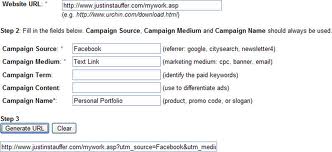
Follow these Steps:
Step 1:
- Enter in the URL for the page you wish to share
- Enter in the place where this link will be shared (in this particular instance, I chose "Facebook")
- Enter in a "Campaign Medium". This will be the type of data that is being shared (in this particular instance, I chose "Text Link")
- Enter in a "Campaign Name." What is this link? How would you identify it easily within Google?
- Generate the URL
- Many social media sites (including Facebook, although it is more generous at 421 chars) offering "Status Updates" require character limits on any posts. Therefore consider shortening your URLs with a "Short URL" app. Depending on where I am posting my update, I typically use Twitpwr.com or tinyurl.com.
- Copy your "Short URL"
- Paste the link onto your social media page.Viola, that's it!
The following day (again assuming you used Google Analytics to track your metrics), log in and go to "Traffic Sources" > "Campaigns". Mid-way down the page, look for the "Dimension" drop down menu. You can cycle through various filters such as "Source", "Campaign", "Medium" as well as other dimensions.
Labels: Facebook, Link Tracking, social media, web analytics
10/05/2009 10:29:00 PM
Subscribe to RSS FeedTweet
Six Traits of a Successful Web Strategist
To those that know me, I evolved into the field. In another life, I was a Creative Director and after immersing myself in the initial strategies that drove the creative execution, I found the evolution quite painless and eventually enjoyable.
To my knowledge there is no formal training or degree in order to become a web strategist. I have however found (6) commonalities of strategists who are my colleagues.
Web Strategists are:
1. Inquisitive. They are the type of person that always asks "why?" until they fully understand a problem. They ask the poignant questions that no one else is prepared to ask.
2. Passionate. This almost goes without saying. There is little reward in carrying out a task that you are not passionate about doing.
3. Able to Prioritize. Strategists understand that in order to reach a goal, you must prioritize your objectives. Priorities may need to be set because of budget, timing or complex needs (ie. in order to reach "z" we must first perform "x" and "y".)
4. Analytical. This is a big one. Strategy is not only developed by listening to one person or reading data from one source. Strategists pull data from a variety of sources. Analytic data is as important prior to starting a campaign as it is after the campaign has been implemented. (You can't know where to go if you don't know where you have been.) In my own experience, I have often times listened completely to a client's pain points only to find out that the source of the problem was not entirely what was communicated - it was a combination of various factors at play.
5. Versed in technology. I know some individuals will likely argue with me on this one, saying that web strategy should focus solely on business needs. I will agree with this view to a point. However more often than not, the best web strategists I have encountered know how and when to apply web tools that will affect a given outcome. This understanding involves a general understanding of "what's under the hood" of these technologies. From my own experience, the best web strategists have experience in one or more of the following: web technology, various forms of interactive marketing, web branding and business Best Practices pertaining to the web.
6. Experienced in FAILING. You read it correctly. Out of failure comes knowledge. The best web strategists will be open in their failures. The web is a new and ever-changing field. What you read and apply today may not work tomorrow. Moreover, there certainly will not be a 'one-size-fits-all' approach to web strategy. Those that recognize this and are cautious in their recommendations for campaigns are the ones that succeed in their trade. I will be the first to admit I have had some catastrophic failures in applications of strategy. However I will quickly add that I have also have had some monumental successes, that I feel have been a direct result of these failures.
Labels: web strategy
8/07/2009 09:31:00 AM
Subscribe to RSS FeedTweet
My suggestions to further enhance Google Analytics
The team responsible for the development of Google Analytics (GA) has developed an extremely robust application and it's always improving. With the recent addition of it's custom reporting and advanced segment reporting, it even meets many of my needs.) That being said, there are several items that I would like to see implemented in the near future.
#1: Customizable dashboard metrics:
I am familiar with Coremetrics and feel it's dashboard customization capabilities are a wonderful complement to the application as a whole. Collected data can be viewed in any number of customizable outputs so it can provide a snapshot to the user.
With regards to GA, some enhancements would allow persistent views of customized data reports to be built in as well. Imagine having the ability to compile a series of customized metrics and view these within the dashboard.
Additionally, I would imagine that within various reports, a new button could be added globally called "add this view to my dashboard". By clicking on this hypothetical button, a snapshot of the particular report would then be saved to a user's dashboard.
Ideally, these customized dashboards would be attributed to an individual's account regardless of user type (administrator vs. user). I would imagine that various users would have separate preferences on snapshots of data, much like Coremetrics' allows as well. Much like the sharing capabilities found within "Advanced Segment" reports, these custom dashboards could also be shared.
Lastly, whereas GA only allows a maximum of (4) dashboards to appear, users could display an infinite number of dashboards modules (assuming performance issues would not be a factor). All dashboards, whether standard or custom, could then be sorted through a drag and drop mechanism, as is currently provided within the application.
#2: Compare metrics from other profiles:
Various profiles can share (1) account, primarily for administrative reasons. GA allows the notion of comparing various metrics as long as the data resides within (1) profile. It would be useful to be able to compare metrics from (2) or more profiles. As a result, individuals would then be able to compare data from subdomains, microsites, even filters.
Naturally, comparisons would be constrained to profiles within (1) GA account as all profiles within an account share the same Account ID. Only administrators of a given account would be able to set up this comparison. Users would be able to view this comparison report only if they have access to each compared domain within a particular account.
#3: Comparing non-sequential date ranges:
Currently GA allows you to choose a sequential date range and even compare it to another date range in the past. Another wonderful enhancement would allow a user the ability to select non-sequential days in a month or times within a given day. This is currently only possible through the "Custom Reporting" tool. I would imagine this sort of within the calendar selection tool (top-right of the application) as an "advanced date selection".
#4: Account migration and/or removal:
This enhancement is more or less utilitarian in nature. If a user is an "administrator" they are, in essence, the owner of an account. An administrator can add other administrators or users however they can not transfer or remove access rights for themselves under an account they have created.
Imagine an administrator sets up a GA account through their own account. They then leave a job or are no longer responsible for administering an account. They can not "pass the baton" to another administrator if they so choose - they are in essence "stuck" with an account unless the account is deleted altogether.
Another related scenario, lies within a "user's" inability to be removed from an account. "Administrators" can grant account access to users and can delete them. Why can't user's delete their own access to a given account?
#5: Integration of Greasemonkey's "Business Notes" Feature:
Routinely, more than one individual reviews metric data. Since the creation of GA's Custom Reports feature, I have found that a little bit of explanation can go a long way in terms of deciphering a report. By merely providing a notes feature (bonus points for integrating this feature with Google Docs), individuals can review customized reports and make sense of the data by reading any explanation I provide for them.
Additional Recommendations:
- Integration of "Google Website Optimizer"
- Integration of Heatmaps
- Enhancements with Real-time data collection
- Enhanced support for off-site data collection
- Collection of offline data
Labels: A/B Testing, Coremetrics, Google Analytics, Link Tracking, Omniture, web analytics, Website Analysis
8/05/2009 09:18:00 PM
Subscribe to RSS FeedTweet
Usability and SEO Are Related
I have always found it interesting that Usability Experts and Search Marketers both discount each other's work as not being relevant. Usability focuses on making a site more intuitive for an individual whereas Search Engine Optimization focuses (primarily) on making a site more intuitive for a search engine.
When compared side by side, both focus primarily on organization and retrieval of data. Let's think about this for a second. The algorithms that a typical search engine uses are built based on retrieving results relevant to how an individual would search for them.
Knowing this, it's easier to understand why when a client comes to me expecting a search engine optimization proposal that I have been known to respond with a proposal that contains tactics such as: "A/B testing," or "site analysis." Frankly (and this is where my colleagues in a competing business may get nervous), each business industry should be offering these skill sets as a service to their clients. I have found this knowledge imperative for developing my web strategies, implementations and subsequent testing. A process, that because of this methodology is no longer linear in it's approach.
Still, I know of many Search Engine Marketers (SEM's) that do not know how to read/write HTML. Conversely I can also think of many Designers, Developers and Information Architect's that have never considered a keyword strategy" or the ramifications that AJAX and/or Flash can have on a website.
A Designer may even tell you "We care more about the experience than the ranking that the site has on a search engine." A SEM may try to convince you that "exposure alone drives conversions." Both of these statements are missing the bigger picture.
In closing, a search engine will entice a user to come to a site as a result of proper page indexing. A properly designed and functional website will entice them to stay. When traffic and in turn content is targeted, usage and subsequently conversions will increase.
Labels: A/B Testing, internet marketing, Search Engine Optimization, web marketing, web strategy, Web Usability, Website Analysis
5/26/2009 09:46:00 PM
Subscribe to RSS FeedTweet
Having Many Facebook Friends Does Not Guarantee Engagement
Let me start off by saying that having many friends on Facebook, Twitter, and/or LinkedIn is important. I am on all three of these sites and use them very actively for different reasons. When you have an audience, chances are greater that your message will be heard.
The problem with this philosophy is also that without properly considering your audience and hand-selecting who you are engaging with, you may also be wasting your resources - let me explain.
Say you work for a retail establishment. Your primary focus is bringing customers in-store to make a purchase. The website may only be a supporting agent to this objective.
By performing a social outreach campaign you attempt to reach out to anyone that will listen. By the end of your endeavors you may even have a formidible friend list.
Yet when looking at your analytic data you see less than 1% are converting. In looking back you may have even targeted the proper demographic audience. In this particular instance, if you did not geo-target this campaign you are likely wasting your energy.
Of course this is an example and it seems so plainly obvious. Yet why are many marketers still considering a successful campaign by have 1,000+ friends on Facebook or Twitter when an extremely miniscule amount of in-store traffic is resulting from these efforts?
Labels: common sense, social media marketing, web analytics
4/04/2009 10:12:00 PM
Subscribe to RSS FeedTweet
Previous Posts
- 3 Things You Can Do Right Now To Improve Your Long...
- Why B2B marketers can no longer ignore mobile tech...
- Common Sense (Email) Marketing
- 5 Ways to Encourage CRM adoption amongst your Sale...
- Successful Performance Planning and Analytics to R...
- Five Questions to Ask Yourself Before Beginning Yo...
- Why is SEO so difficult to explain and implement?
- How Will Google Instant Affect Search Engine Marke...
- Performing a Heuristic Evaluation
- Parsing Data Using Advanced Segmentation